

Can Your Backup Survive Ransomware? 12 Tests Your MSP Should Run
Your backup dashboard is green. Last night’s jobs completed. Copies exist onsite and in the cloud. That sounds reassuring, but it does not answer the question that matters during a ransomware incident: Can your business restore clean systems and resume critical work within an acceptable time?
Ransomware operators often try to weaken recovery before encrypting production data. They may seek administrative credentials, delete recovery points, change retention settings, encrypt connected repositories, or remain in an environment long enough to contaminate multiple generations of backups. A successful job report confirms that data was copied. It does not prove that the copy is complete, protected, clean, accessible, or usable under incident conditions.
CISA recommends maintaining offline, encrypted backups and testing them regularly. NIST’s backup guidance for managed service providers likewise treats backup planning, maintenance, and testing as connected responsibilities. The practical standard is therefore recovery evidence, not backup activity alone.
What Ransomware Resilient Backup Actually Means
A ransomware-resilient backup program gives the organization a reasonable, tested path to a known-good state even when production systems or privileged accounts are compromised. It combines several controls: separate copies, protected access, useful retention, immutability or offline isolation, documented recovery procedures, and repeated restore testing.
An immutable backup is a recovery copy that cannot be modified or deleted during its protected retention period. Depending on the platform, immutability may rely on write-once-read-many storage, a locked vault, object lock, or another enforced retention control. The important distinction is whether a compromised administrator can reverse the setting, shorten retention, or delete recovery points. A feature that is enabled but still reversible does not provide the same assurance as a locked configuration.
Immutability is powerful, but it is not a complete recovery strategy. An immutable copy can preserve incomplete data, retain malware, lack an application dependency, or take too long to restore. Your MSP should test the whole recovery path.
The 12 Ransomware Backup Tests Your MSP Should Run
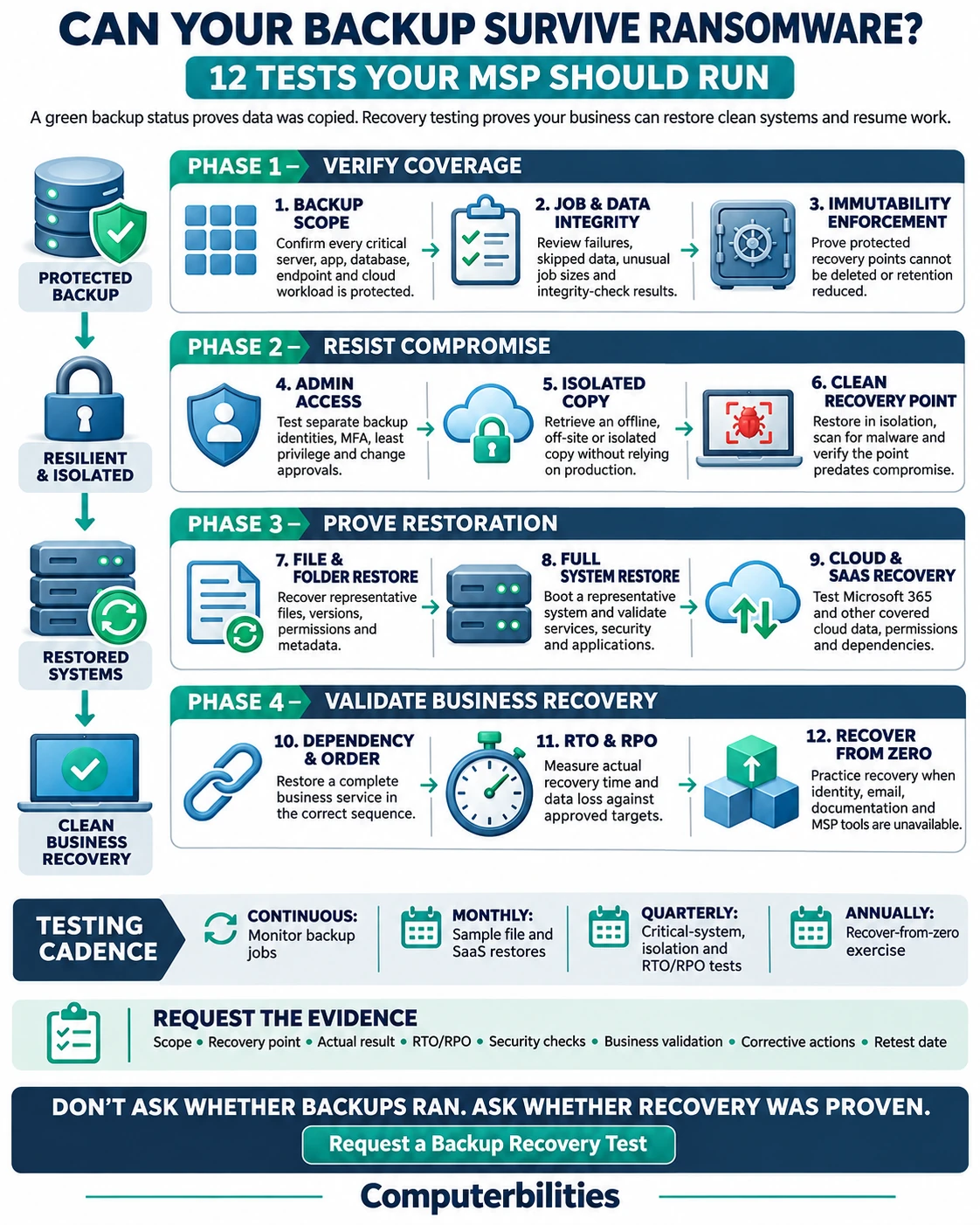
1. Backup Scope and Coverage Test
Start by comparing the backup inventory with the systems the business actually uses. The review should cover servers, virtual machines, endpoints where business data is allowed to live, databases, line-of-business applications, network-device configurations, file shares, identity services, and cloud platforms such as Microsoft 365. It should also identify dependencies and any data excluded by policy.
This test catches a common failure: the backup system works exactly as configured, but a new application, storage location, user group, or cloud workload was never added. The MSP should reconcile backup scope after migrations, acquisitions, office changes, major application updates, and changes in data ownership.
Evidence to request: A current asset-to-backup coverage matrix showing each critical workload, owner, backup method, schedule, retention, recovery priority, and last validated restore date.
2. Backup Job and Data Integrity Test
Next, verify more than the job status. The MSP should review failed, partial, missed, and unusually small backup jobs; confirm that alerts reached the right people; and check whether the repository can validate stored data through checksums, consistency checks, or platform-native integrity verification.
A green dashboard can hide warnings, skipped files, application snapshot failures, expired agents, capacity limits, or credentials that no longer work. Trend the results instead of reviewing only the latest run. A sudden drop in backup size or an unexplained change in duration deserves investigation because it may indicate missing data or abnormal activity.
Evidence to request: Recent job history, exception records, integrity-check results, alert-response notes, and proof that recurring failures were corrected rather than merely acknowledged.
3. Immutable Backup Enforcement Test
Ask the MSP to prove that the protected recovery points cannot be altered or deleted before retention expires. In a controlled test, an authorized administrator should attempt the relevant destructive actions: delete a recovery point, reduce retention, stop protection with data deletion, disable soft delete, or unlock the vault. Expected results must be defined in advance and the test must not endanger production recovery copies.
The test should also distinguish enabled immutability from locked immutability. Some platforms allow an administrator to reverse an enabled setting; a locked state may be irreversible for the retention period. Microsoft’s backup guidance notes that immutable storage and vault locking are intended to block modification or premature deletion, including destructive administrative operations.
Evidence to request: Configuration screenshots or exports, lock status, retention policy, controlled deletion-test results, and alerts generated by the attempted change.
4. Backup Administrator Compromise Test
Assume an attacker has obtained a production administrator’s password. Can that identity also manage backup policies, delete copies, change retention, or access recovery keys? Your MSP should test role separation, multifactor authentication, privileged-access workflows, emergency accounts, and approval requirements for high-impact changes.
Backup administration should not depend on the same everyday accounts and trust path used for production. Where the platform supports multi-user authorization or out-of-band approval, test the full workflow. The goal is to prevent one stolen identity from controlling both the systems being attacked and the recovery copies needed to rebuild them.
Evidence to request: A permissions review, privileged-role list, MFA and approval test results, evidence of separate administrative identities, and an action plan for excessive access.
5. Offline and Isolated Copy Test
Confirm that at least one useful recovery path remains outside the attacker’s immediate reach. Depending on the environment, this may be an offline copy, an isolated account or subscription, an immutable cloud vault, or media that is disconnected after backup. The MSP should demonstrate how the copy is located, authenticated to, decrypted, and restored when the normal management plane is unavailable.
Isolation must be tested operationally. A copy that is technically separated but requires an unavailable domain controller, inaccessible password vault, missing encryption key, or untested network route may not help during an incident. CISA specifically advises organizations to keep backups offline because ransomware may attempt to find and delete accessible copies.
Evidence to request: A documented isolated-copy architecture, successful retrieval record, key-access validation, and the measured time required to make the copy available for restoration.
6. Recovery Point Cleanliness Test
A restore point must predate the attacker’s persistence and remain safe to use. The MSP should practice using incident evidence to select a candidate point, restore it into an isolated environment, scan it with current security tools, review indicators of compromise, and validate expected configurations before reconnecting anything to production.
This is especially important when an attacker may have been present for days or weeks. Restoring the newest copy without checking the incident timeline can reintroduce malicious accounts, scheduled tasks, remote-access tools, or altered configurations. Cleanliness is a security decision, not simply a date selected from a calendar.
Evidence to request: The selected recovery point and rationale, scan results, security-review findings, approval criteria, and the person authorized to declare the restored workload clean.
7. Representative File and Folder Restore Test
A small restore is the fastest way to catch routine recovery problems. Select representative files from different systems and ages, including a recent document, an older retained file, a large file, a permissions-sensitive folder, and data with a known owner. Restore to an alternate location so the test cannot overwrite live information.
Users or data owners should open the restored items and confirm that the contents, metadata, version, and permissions are usable. Merely completing the restore wizard is not validation. This test should include sampling across departments and storage types instead of repeatedly restoring the same easy file.
Evidence to request: A restore ticket listing source, recovery point, destination, elapsed time, validation owner, content checks, permission checks, and any exceptions.
8. Full System and Bare Metal Restore Test
File recovery does not prove that a server or workstation can be rebuilt. Your MSP should restore a representative system into an isolated virtual or physical environment and verify operating-system boot, storage, networking, identity, application services, patches, security controls, and business functionality.
For physical systems or specialized workloads, test the documented bare-metal or alternate-hardware procedure. Confirm that installers, licenses, drivers, encryption keys, certificates, and configuration records are available. Measure hands-on effort as well as elapsed time; an automated image restore may still require hours of manual application repair and validation.
Evidence to request: A step-by-step restore record, boot and service checks, missing dependency list, measured recovery time, responsible technicians, and business-owner acceptance.
9. Cloud and SaaS Recovery Test
Cloud availability is not the same as customer-controlled recovery. Test the workloads your company is responsible for protecting, such as Microsoft 365 mailboxes, OneDrive, SharePoint, Teams data, cloud databases, and SaaS applications. Verify granular recovery, version recovery, permissions, and restoration to an alternate user or location where appropriate.
Pay attention to retention gaps and interconnected data. A restored SharePoint file may depend on permissions, links, metadata, workflows, or a user identity that must also be recovered. The test should reflect how employees use the service, not just what the backup vendor can technically export.
Evidence to request: Results for each covered cloud workload, including item-level and larger restore scenarios, restored permissions, retention tested, elapsed time, and user validation.
10. Application Dependency and Recovery Order Test
Business systems rarely operate alone. An estimating platform may need identity, databases, file storage, licensing, DNS, and network connectivity. Accounting may depend on a server, shared drive, email, and bank-access controls. Restoring components in the wrong sequence can extend downtime or create inconsistent data.
The MSP should map dependencies and run a scenario that restores a complete business service in the approved order. Technical teams then verify system health, while an employee who knows the workflow confirms that real work can resume. The recovery plan should also describe temporary manual processes for functions that cannot return immediately.
Evidence to request: A service dependency map, restoration sequence, technical checkpoints, business-user test script, and recorded decisions about temporary workarounds.
11. RTO and RPO Validation Test
Recovery time objective, or RTO, is the target time to restore an agreed service. Recovery point objective, or RPO, is the maximum acceptable data-loss window measured from the disruption back to the usable recovery point. These targets should come from business impact, not from whatever the current backup product happens to provide.
Run a timed test under realistic constraints. Include backup retrieval, data transfer, infrastructure preparation, security review, application recovery, user validation, and decision time. Then compare the result with the approved RTO and RPO. If the test misses a target, leadership needs a documented choice: improve the architecture, change the process, fund a faster recovery option, or formally accept the risk.
Evidence to request: Actual versus target RTO and RPO by critical service, the timing of each recovery phase, bottlenecks, data-loss window, and an owner and due date for corrective actions.
12. Recover From Zero Exercise
The final test assumes the normal environment is unavailable or untrusted. Participants should work through containment, escalation, access to plans and contacts, clean recovery infrastructure, identity restoration, prioritized service recovery, communications, security validation, and controlled return to production. The exercise can begin as a tabletop and mature into a technical drill for selected critical services.
Test the loss of conveniences people normally depend on: corporate email, password vaults, ticketing, remote-management tools, documentation portals, and the primary office network. Microsoft recommends regularly testing a recover-from-zero scenario because a plan that works only when production services remain available does not reflect a serious ransomware event. Finish with a lessons-learned review and retest material failures.
Evidence to request: An exercise timeline, participant and decision log, recovered services, communication results, measured gaps, remediation owners, deadlines, and the date of the next validation.
A Practical Ransomware Backup Testing Schedule
Testing frequency should reflect business impact, system change, compliance obligations, and the consequences of downtime. There is no universal cadence for every workload. A practical starting point is continuous job monitoring; monthly sampling of file and SaaS restores; quarterly tests of critical systems, isolated copies, privileged controls, and RTO/RPO performance; and an annual recover-from-zero exercise. High-change or high-impact systems may need more frequent validation.
Retest after major migrations, backup-platform changes, identity redesigns, retention changes, new locations, acquisitions, or a real security incident. A prior successful test proves only that a particular recovery path worked under the conditions tested at that time.
What a Recovery Validation Report Should Contain
After each exercise, your MSP should provide a short report that a business leader can understand. At minimum, it should record:
- the system, data set, recovery point, test scope, and assumptions;
- the expected result and the acceptance criteria agreed before testing;
- actual RTO, RPO, restore duration, and hands-on effort where applicable;
- integrity, malware, permissions, application, and business-user validation;
- failures, workarounds, residual risks, and any part of the test not completed;
- corrective actions with owners, due dates, and a planned retest date; and
- evidence that the report was reviewed by the system owner and appropriate leadership.
This record turns backup testing into an accountable risk-management process. It also gives leadership useful evidence for cyber insurance discussions, audits, budgeting, and service-provider reviews without pretending that one successful drill guarantees every future recovery.
Questions to Ask Your MSP
- Which critical systems are not currently covered, and who accepted that risk?
- Can a compromised production administrator delete or weaken our backup copies?
- Which recovery points are locked or immutable, and for how long?
- When was each critical service last restored and validated by a business user?
- What RTO and RPO did the last test achieve, and what delayed recovery?
- How would we recover if our domain, email, password vault, and MSP tools were unavailable?
- What corrective actions remain open, and when will failed tests be rerun?
Frequently Asked Questions
What is ransomware backup testing?
Ransomware backup testing is a controlled process that verifies whether protected data and systems can be restored to a known-good state after an assumed ransomware compromise. It evaluates backup coverage, integrity, immutability, access controls, cleanliness, restore procedures, dependencies, and the organization’s ability to meet recovery targets.
Does an immutable backup guarantee ransomware recovery?
No. Immutability helps prevent protected recovery points from being changed or deleted during their retention period, but it does not guarantee that the data is complete, clean, compatible, or fast enough to restore. Restore testing and business validation are still required.
How often should an MSP test backups?
The cadence should be based on business impact and the rate of change. Monitoring should be ongoing, small restore samples can be run monthly, critical-service recovery tests can be run quarterly, and a broader recover-from-zero exercise can be run annually. Adjust the schedule for regulatory needs and high-risk systems.
What is the difference between a backup test and a disaster recovery test?
A backup test confirms that selected data or a system can be restored. A disaster recovery test covers the larger process: people, decisions, infrastructure, dependencies, security validation, recovery order, communications, and return to business use.
Should backup testing be performed in production?
Testing should normally use an isolated or alternate destination to avoid overwriting live data, disrupting users, or reconnecting an unverified workload. The exact design should be approved for the system and should protect both production and valid recovery copies.
What should leadership receive after a recovery test?
Leadership should receive the scope, expected result, actual result, RTO and RPO performance, validation evidence, identified gaps, residual risk, corrective-action owners, deadlines, and the retest date.
Validate Recovery Before You Need It
The strongest answer to ransomware is not “our backups ran.” It is “we restored a representative system from a protected recovery point, verified it was clean, confirmed the application worked, measured the recovery time and data-loss window, corrected the gaps, and retained the evidence.”
Computerbilities helps small and midsize organizations assess backup and disaster recovery readiness across systems, cloud services, and operating workflows. For businesses in Raleigh, Cary, Durham, the Triangle, and New York City, the next useful step is a scoped recovery validation based on a representative system or data set.
Request a Backup Recovery Test
Or begin with our free 15-minute IT Priorities Call. Recovery testing and detailed assessments are separately scoped.